UNSCALED 1 - INTRO
UNSCALED is a single-player, high-tempo 'movement shooter' roguelike that is designed with accessibility as a core principle.
Whilst celebrated as the saviours of countless realms and lives, the heroes of the realm spin a fake narrative to hide the fact that they themselves are the monsters they claim to strike down. You play as one of the betrayed, a varied collective of villains and monsters that have been victimised by this adventuring party and are seeking revenge.
The reasons for making UNSCALED
UNSCALED is a game that serves 2 main purposes:
- Fill a gap in the market for accessible yet fast-paced shooters through deep customisation of the games difficulty and accessibility options.
- Advance my personal skill as a Technical Artist through shaders, rigging and other technical systems I wish to become more experienced with.
Whilst movement shooters are a beloved genre for more competitive and experienced gamers, they require a high mechanical, cognitive and sensory skill that not all who play games have. This gives the genre a high barrier to entry that UNSCALED should bridge.
Gameplay Loop
On the first time opening the game, a quick survey will help speed up setting all the options on assistance systems the game has in place. Afterwards, will likely follow
Gameplay Systems
I wanted a robust system under-the-hood that made adding new characters, abilities and movement states from walking to flying easy to add. Godot's docs highly recommend using composition over inheritance, where modular child nodes are used for different systems rather than combining it all into one class.
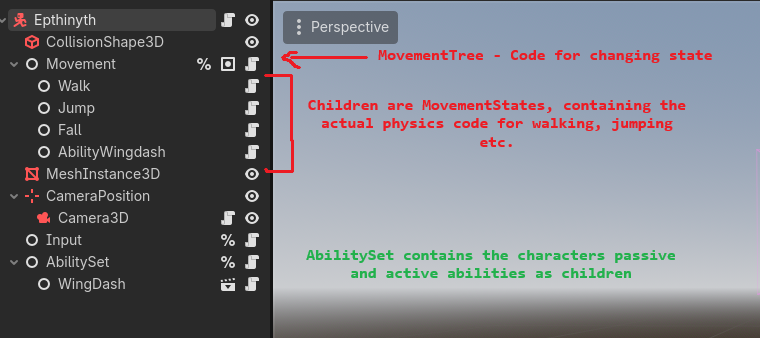
Movement
Movement uses a single state machine, with the actual physics code separated into different movement state or 'mstate' scripts.
# MovementTree.GD

# Handles changing state. Arguments can be used for many purposes, such as
# storing context for the state switch or saving look directions / velocities.
# Returns whether state change was successful.
func change_to_state(new:String, arguments:Dictionary) -> bool:
	var new_state : MovementState = null
	for i in _possible_states:
		if i.name == new:
			new_state = i

	if new_state == null:
		return false
		push_error("State name %s not found!" % new)

	var old_state : MovementState = current_state
	old_state.on_state_exited(arguments)
	current_state = new_state
	new_state.on_state_entered(arguments)

	print("Changed from state %s -> %s" % [old_state.name, new_state.name])
	if !arguments.is_empty():
		print(" ^Additional arguments: %s" % arguments)
	return true
This state machine provides several 'hooks' to run functions at various points during the transition. For example, here is the dash that the first character will have
extends MovementState

#mstate_wingdash.gd
# Custom Movement state for the dragon's dash. Dash direction is calculated
# at the start of the dash and applied for a short direction, ignoring gravity.

var current_dash_direction : Vector3
var current_dash_time : float

var dash_duration : float = 0.15
var dash_velocity : float = 12.0


func _on_state_entered(arguments:Dictionary):
	var input_dir = input.get_walk_vector(camera)
	current_dash_direction = camera.global_transform.basis * Vector3(
		input_dir.x, 0, input_dir.y)
	current_dash_time = 0.0

# Same as _physics_process but is only run when this state is active.
func _process_physics(delta:float):
	body.velocity = current_dash_direction * dash_velocity
	body.move_and_slide()

	current_dash_time += delta
	if current_dash_time > dash_duration:
		movement_tree.change_to_state("Fall", {"previous" :" dash_ended"})