UNSCALED 1 - INTRO
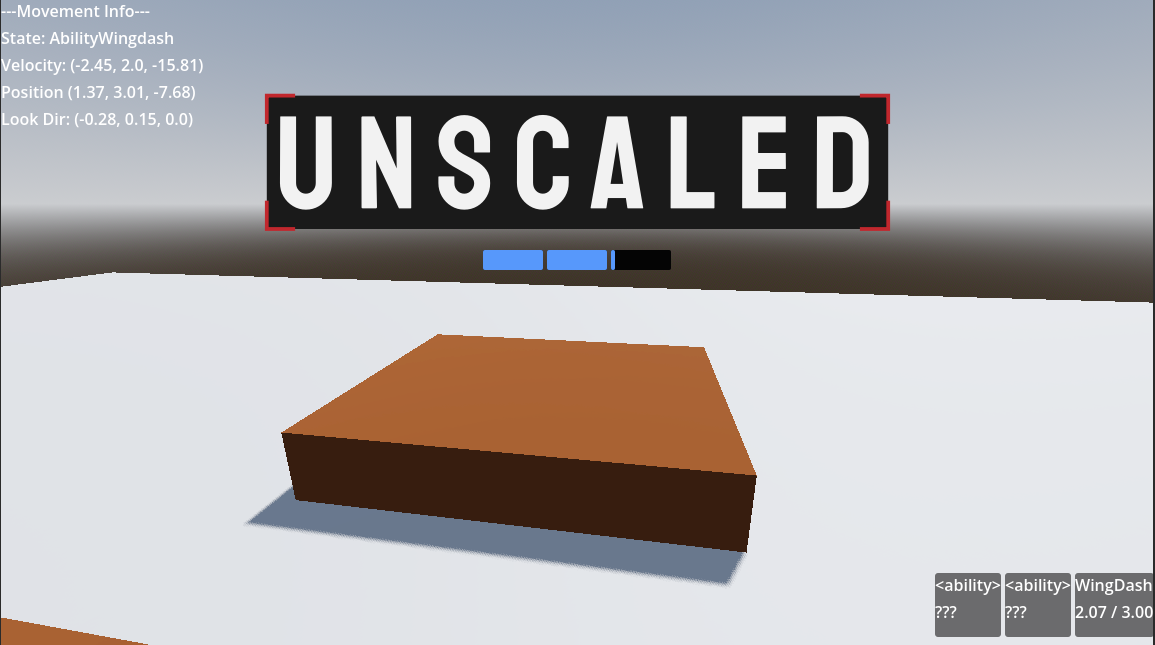
Whilst celebrated as the saviours of countless realms and lives across time, there is a false narrative about many of the heroes that have emerged over the years; They themselves are puppets of the monsters they claim to strike down, acting just as depraved behind closed doors. You play as one of the betrayed, a ragtag group of vengeful victims who seek to expose and end this cycle.
The reasons for making UNSCALED
UNSCALED is a game that serves 2 main purposes:
- Fill a gap in the market for accessible yet fast-paced shooters through deep customisation of the games difficulty and accessibility options.
- Advance my personal skill as a Technical Artist through shaders, rigging and other technical systems I wish to become more experienced with.
Whilst movement shooters are a beloved genre for more competitive and experienced gamers, they require a high mechanical, cognitive and sensory skill that not all who play games have. This gives the genre a high barrier to entry that UNSCALED should bridge.
Programming the Ability System
I wanted a robust system under-the-hood that made adding new characters, abilities and movement states from walking to flying easy to add. Godot's docs highly recommend using composition over inheritance, where modular child nodes are used for different systems rather than combining it all into one class.

If you want the end result, here's the first dash ability that I use as an example throughout this entry:
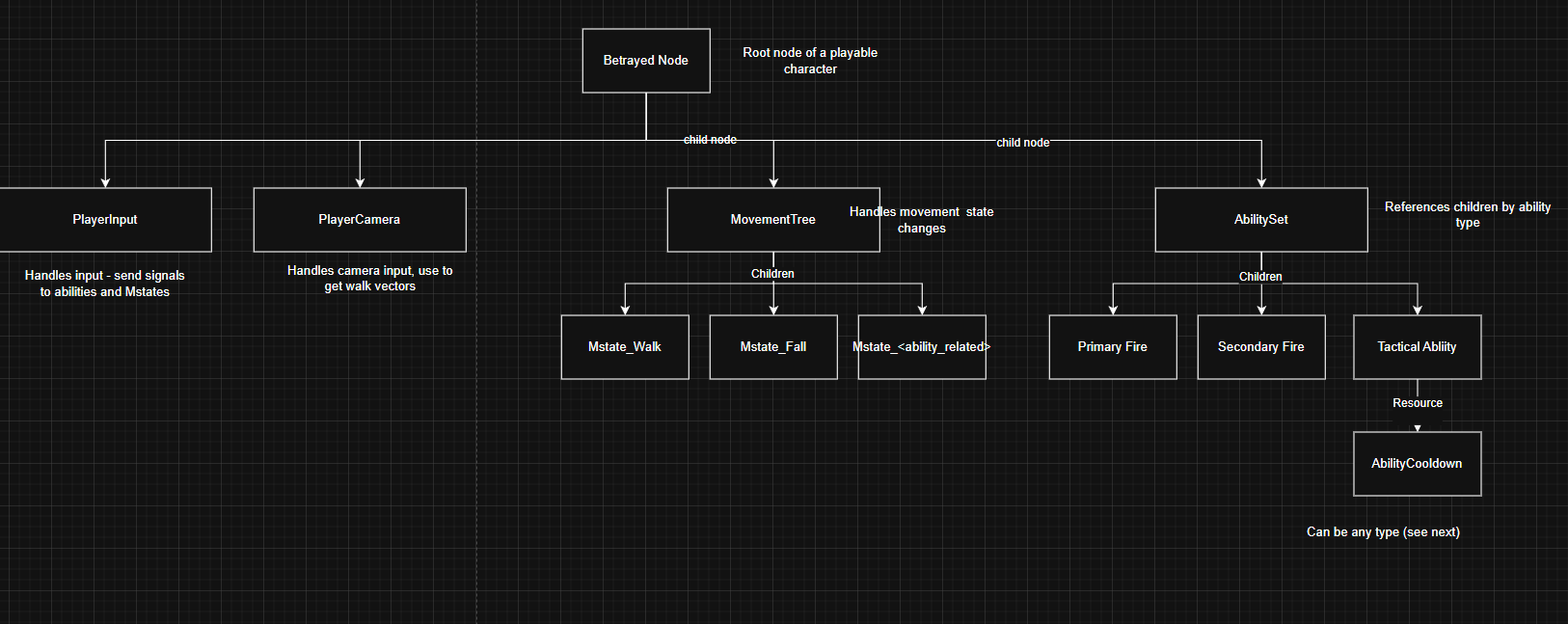
Hierarchy of a Player Character
The player character is made up of a defined hierarchy of nodes, some with strict classes and others not. Below is a quick graph that displays this hierarchy. (click to view fullscreen!)
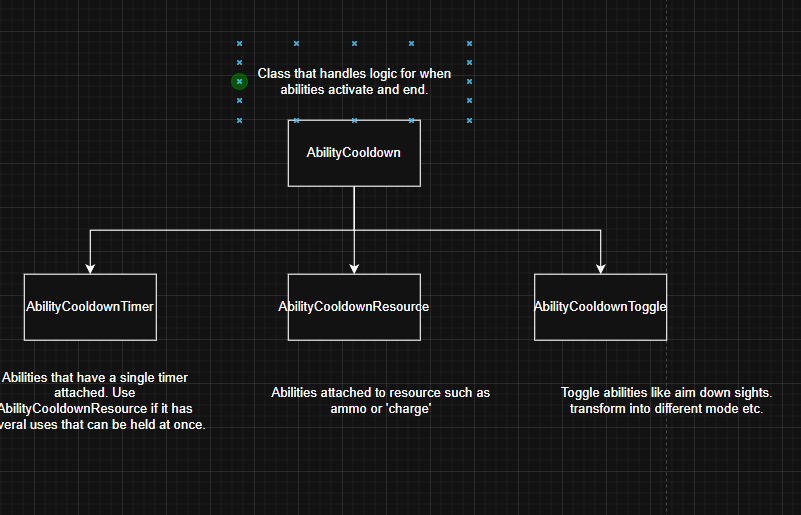
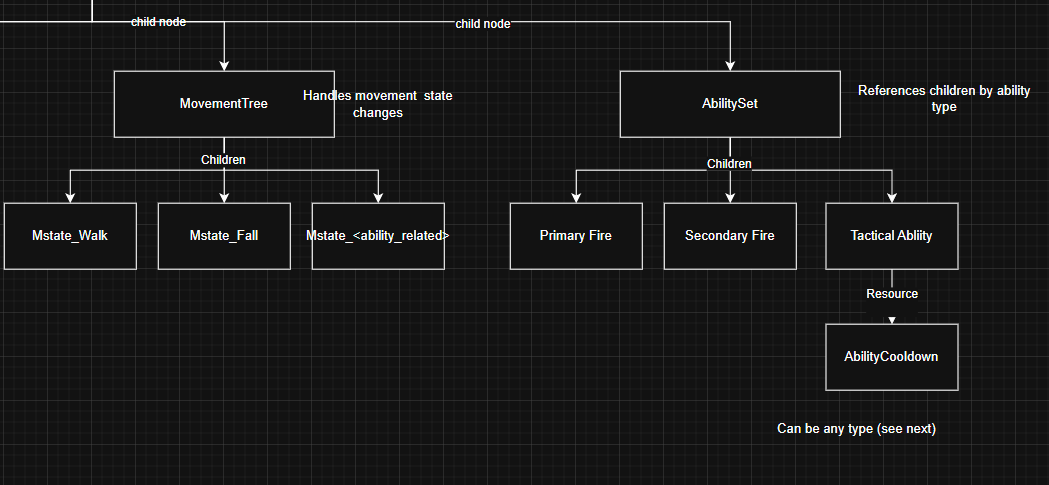
Let's take Mesaryth, the first character I'm working on, as an example. She is a dual-revolver-wielding dragon with a quick wing dash. Right now, only the afformentioned utility ability - Wing Dash - is added. This is a dash that can store up 3 charges and will slowly regenerate over time.
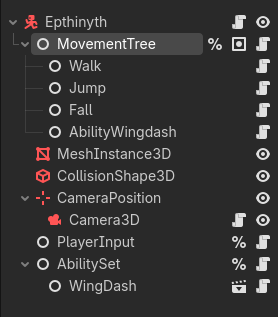
Movement
Movement uses a state machine called MovementTree. The actual physics code for changing velocity etc. is only contained in the different movement state or 'mstate' scripts, the MovementTree. Only one of these 'm_states' can be active at a time
# MovementTree.GD

# Handles changing state. Arguments can be used for many purposes, such as
# storing context for the state switch or saving look directions / velocities.
# Returns whether state change was successful.
func change_to_state(new:String, arguments:Dictionary) -> bool:
	var new_state : MovementState = null

    #return false if state given is not valid
	var state_found : bool = false
	for i in _possible_states:
		if i.name == new:
			new_state = i
			state_found = true
	if !state_found:
		push_error("Couldn't find state  %s" % new)
		return false


	var old_state : MovementState = current_state
	old_state.on_state_exit(arguments)
	current_state = new_state
	new_state.on_state_entered(arguments)

	print("Changed from state %s -> %s" % [old_state.name, new_state.name])
	if !arguments.is_empty():
		print(" ^Additional arguments: %s" % arguments)
	return true
This state machine provides several hooks to run functions at various points during the transition. For example, here is the Mesaryth's dash m_state.
extends MovementState

#mstate_wingdash.gd
#Movement state for the dragon's dash

var current_dash_direction : Vector3
var current_dash_time : float

var dash_duration : float = 0.2
var dash_velocity : float = 16.0

var dash_jump_impulse : Vector3 = Vector3(0.0, 8.0, 0.0)


func on_state_entered(arguments:Dictionary):
	current_dash_time = 0.0

	# Get a suitable dash direction. Will just be look direction if no walk input.
	var input_dir = input.get_walk_vector(camera)
	if input_dir.is_zero_approx():
		current_dash_direction = -camera.global_transform.basis.z
	else:
		current_dash_direction = input.get_walk_vector(camera)


# Dash will just apply the above speed and direction throughout.
# if Ends early if player jumps.
func _process_physics(delta:float):
	body.velocity = current_dash_direction * dash_velocity


	if body.is_on_floor() and Input.is_action_just_pressed("move_jump"):
		body.velocity += dash_jump_impulse.rotated(Vector3.FORWARD, camera.rotation.x)
		movement_tree.change_to_state("Jump", {"previous" :" dash_jump"})
	body.move_and_slide()

	# Limit dash to a tiny timeframe
	current_dash_time += delta
	if current_dash_time > dash_duration:
		movement_tree.change_to_state("Fall", {"previous" :" dash_ended"})
When the ability is entered, the camera direction as well as player input is used to decide the dashes direction immediatly.
You may have noticed that change_to_state() can take a dictionary of arguments. This can be used to create unique transitions based on what the old movement state was. The main use currently is debugging as it helps show what the exit condition for states are, but in future it could help more complex characters chain together these states for unique movement tech!
Abilities
Abilities, by nature, are extremely variable. As a result, it can be difficult to create a system that facilitiates every possible idea I might come up with in the future.
Right now, since there is little in the way of visuals, abilities are only made up of a few key parts:
- The root,
AbilityNode. Moslty just connects and sends signals where they need to go. AbilityInput, a sort of 'compatibility' layer between the PlayerInput and an abilities activation/deactivation. Most abilities can use a premade variant of this:AbilityInputOneShotfor abilities that activate once and immedieatlyAbilityInputChanneledfor abilities that can be held down (Auto weapons are a good example).AbilityInputTogglefor abilities that can switch between two or more states (Transformations, swapping passive buffs perhaps)
- An
AbilityCooldown, a special resource stored in the AbilityNode. This handles logic about when an abiliity can start and stop. It also has a few variants:AbilityCooldownNoneis self explanatory - use whenever!AbilityCooldownTimeris used for single-charge abilities with a set cooldown.AbilityCooldownResourceis the most complex, and is used for abilities that can store, use and regain a generic 'resource' value. Most commonly this is ammo or, in Mesaryth's case, how many uses of Wing Dash are available.
- A new
mstate_<abilityname>, if needed! - Any extra UI elements such as a custom charge display.
Going back to Wing Dash, here is the scene for that ability:
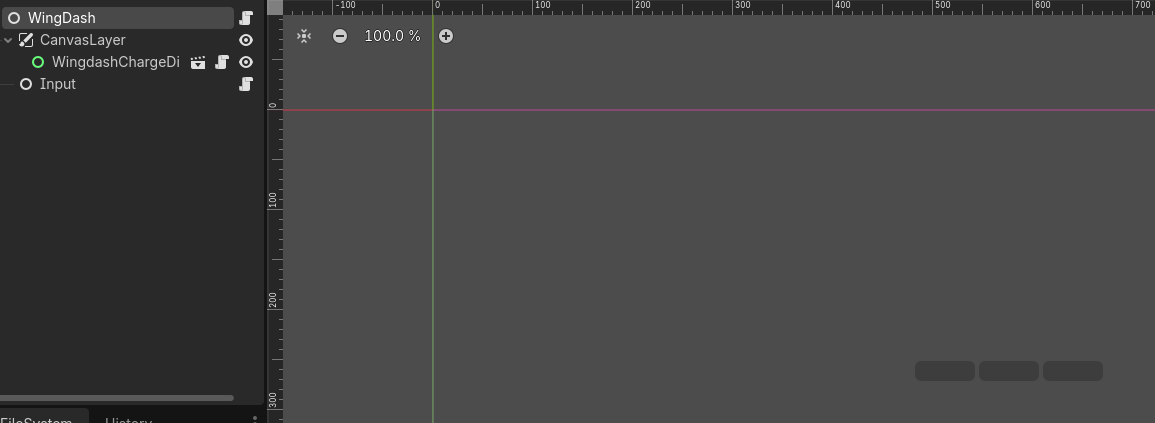
A custom WingdashChargeDisplay uses 3 bars to show how many dashes are left, and a Input with a AbilityInputOneShot runs the behind-the-scenes logic of asking the ability 'Do i have enough energy to dash?' and starting if so.
To finish this first post, here is a quick look at how the AbilityResourceCooldown works:
extends AbilityCooldown

#ability_cooldown_resource.gd

# Cooldown used for abilities that can store, use and regain
# a generic 'resource' value. Most commonly this is used for
# abilities that have multiple charges that replenish over time.
class_name AbilityCooldownResource

# Use to hook up control nodes!
signal resource_changed(resource:float)

@export var resource_is_uptime : bool # True means resource will be drained by seconds elapsed, false means they are more like charges/ uses.

@export var max_resource : float = 3.0
var current_resource : float : set = _set_current_resource

# Cost of using ability, or cost/second if channeled.
@export var resource_cost : float = 1
#Set a minimum amount
@export var min_cast_override : float  = -1

#Resource regenerated per second
@export var resource_regen_rate : float = 1.0

#Use for abilities that are instanly used for [resource_cost] each time.
func ability_used()->void:
	current_resource -= resource_cost
	print("ability now has %.2f charge" % current_resource)

#Use for abilities that drain resource per second.
func ability_channeled(delta:float)->void:
	current_resource -= resource_cost * delta
	print("ability now has %.2f charge" % current_resource)

func is_ability_ready()->bool:
	if min_cast_override > 0:
		return current_resource > min_cast_override and current_resource >resource_cost
	return current_resource > resource_cost

# Calls every frame this ability is not fully disabled.
func timer_tick(delta:float):
	current_resource += resource_regen_rate * delta

func _set_current_resource(new:float):
	current_resource = clamp(new, 0, max_resource)
	resource_changed.emit(current_resource)
Its mostly just a bunch of checking, adding and subtracting the same numbers but with handy functions to create a layer of abstraction!
TODO: write about gun stuff..