UNSCALED 3 - Friction + Floatin'
Welcome back. I've been busy learning and experimenting alot with maths and physics in games.
The friction with implementing friction
UNSCALED is a movement shooter, and movement should feel fluid! Snapping instantly to whatever velocity input_direction * walk_speed churns out works well for many games, but UNSCALED absoultely needs some kind of friction system. A big issue that instantly comes to mind is that knockback is impossible (or atleast made much more convoluted) with the above solution as it will be overwritten every frame.
Friction allows time for knockback or boosts to take affect before slowing the player down to stationary / their standard walking speed.
I quickly found friction was a challenging system for the two reasons below:
- Making friction (acceleration) that doesnt break at different frame rates.
- How fast should friction be? Does the player want to quickly match to their input 'target' or ride big boosts from rocket jumps etc?
Solution one - Exponential decay
Using lerp and delta is pretty-well documented on being a pretty terrible idea since it can completely break at different frame rates or if the frame rate takes a hit. A safer approach is to use exponential decay. This is luckliy something I found a solution in by an amazing talk from Freya Holmér:
https://www.youtube.com/watch?v=LSNQuFEDOyQ
Implementing their solution in GDScript is super simple and works wonders!
func exp_decay(from:Vector3, to:Vector3, decay: float, delta_time:float)->Variant:
	return to+(from-to)*exp(-decay*delta_time);
Solution two - 'Pushback' and Dot products
As mentioned before, sometimes low friction is better than high. If a player wants to do a rocket jump to traverse quicker than walking, high friction will quickly negate any speed boost and set them back to a regular walk speed.
I vaugely remembered hearing about dot products in my sixth-form maths, often used as a way to get the angle between two vectors. I realised that this could be used to get the difference between the direction of the players velocity vs the direction they want to go.
# Returns a number from -1 to 1. Use to decide whether to apply high
# or low friction
# 1 means that input direction == horizontal velocity
# 0 means that input direction == -horizontal velocity
# Walk vector is just a camera-alligned input direction in x and z direction.
func _get_input_dot_to_velocity(walk_vector:Vector3)->float:
	return body.velocity.normalized().dot(walk_vector)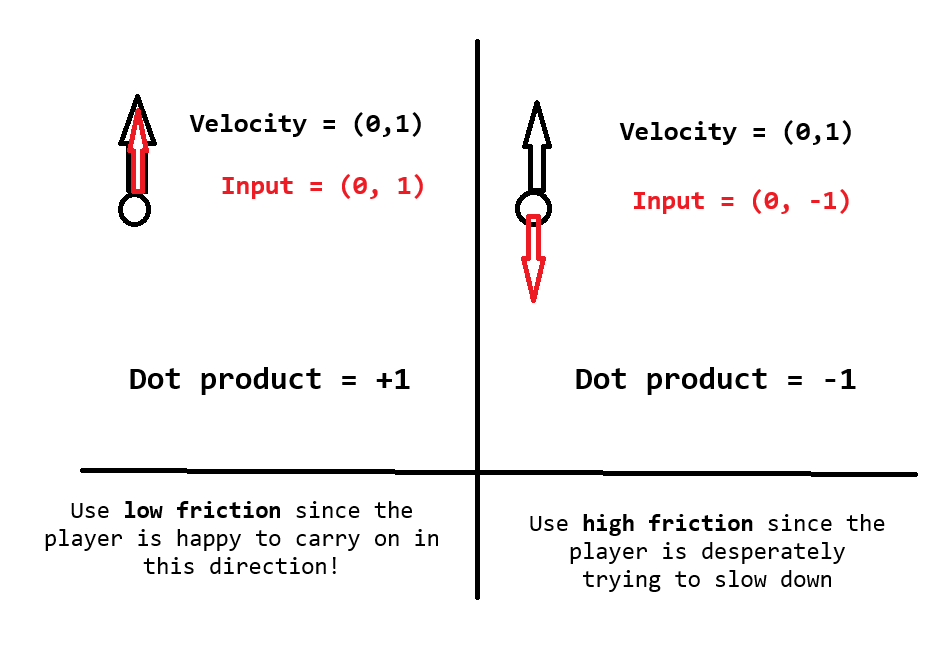
All thats needed is to map the dot product between a high friction at -1 (which I call 'pushback') and a low friction at 1 (which I just called 'friction'). This technically works as is. Although, If the player is pressing nothing, the dot product is always 0. This isn't necessarily bad, it will just be halfway between friction and pushback.
However in this game I want to prioritise knockback as a tool rather than a hinderance, so I added an extra clause where, if the player is inputing nothing, default the full knockback force. With that in mind, here is the system I'm now using in the fall state:
func _process_physics(delta:float):
	var walk_vector : Vector3 = input.get_walk_vector(camera)
	var decay : float = movement_tree.globals.air_accel_friction

	# player is inputting a walk direction - change air friction to
	# help player if fighting current horizontal velocity
	if !walk_vector.is_zero_approx():
		var walk_dot : float = _get_input_dot_to_velocity(walk_vector)
		decay = lerp(
			movement_tree.globals.air_accel_pushback, #High friction
			movement_tree.globals.air_accel_friction, #low friction
			clamp(walk_dot, 0.0, 1.0))
		print(clamp(walk_dot, 0.0, 1.0))

	var target_movement : Vector3 = walk_vector * movement_tree.globals.air_speed
	var new_horizontal : Vector3 = exp_decay(_get_horizontal_velocity(),
	target_movement, decay, delta)
	_set_horizontal_velocity(new_horizontal)

I decided to use a clamp. This means that anything closer to moving horizontally to the force wont increase friction. Below is a comparison of dashing and holding the backwards key (quick stop), dashing and holding the forward key (slow glide) and the same but with holding jump (long air time really lets you glide!!)
Mesaryth Kit Revisit
One of the inspirations for working with the friction was that I had already planned to slightly alter Mesaryth's kit for the game. Shes a character that is intended to fly alot, yet her primary fire is a slow projectile. Her secondary fire is the worst offender since it uses a piercing shot that would be really hard to get value out of in mid-air!
There were a lot of changes covered in the video, but heres the patchnotes:
Primary
- Now hitscan
- Reload removed
- Uses a new bullet tracer system that generates mesh on the fly.
Secondary
- Now an explosive that detonates on contact with floor
- Deals massive knockback to player (horizontal bias)
- Has a hud progress bar now!
Passive
- Now reduces terminal velocity rather than giving the player lowered gravity.
Bullet Tracers
The bullet tracers for the new primary fire are custom made since there isnt really a 'Line3D node' in Godot by default. Instead, I generate a custom mesh.